Add or edit a project (showcase)
Audience: operators · Scope: the Showcases screen (the public Projects) · Last reviewed: 2026-07-12
What this does — Adds a project (a case study) to the public Projects page — a completed installation with its location, industry, photos, and the Beta-Calco products used. In the admin these are called Showcases.
Before you start
- Be signed in — see Log in to the admin area.
- Gather the project's name, location, industry, photos, and the list of products used.
Steps
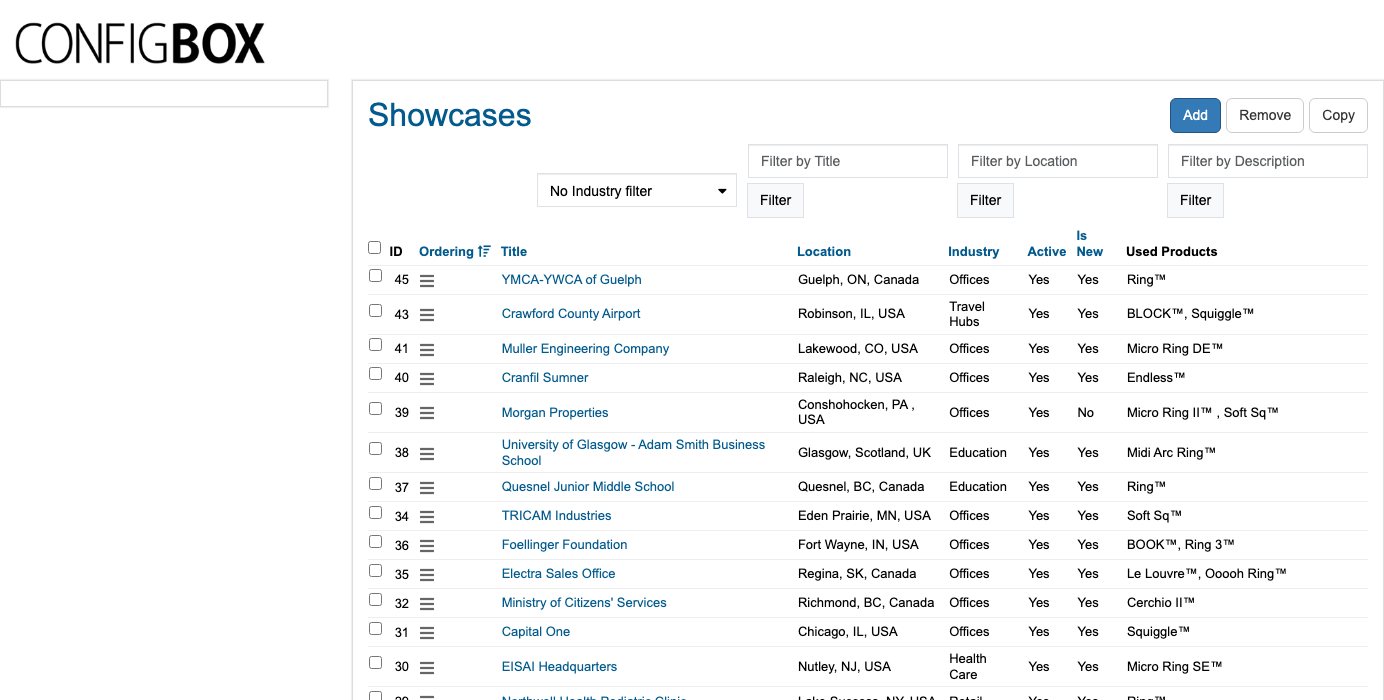
- Click Showcases in the menu. The list shows each project's Title, Location, Industry, whether it's Active, whether it's marked Is New, and its Used Products.
- Click Add (or a project's title to edit it).
- Fill in the project's details — its title, location, industry, description, photos, and the products it features — then set Active to Yes to publish it.
- Click Save.
What happens next
- Active projects appear on the public Projects page, where visitors can browse and filter them (for example by industry).
- Use the drag handle on the list to control their order.
Good to know
- Is New flags a project as recently added (it may be highlighted on the site).
- Used Products ties the project to the products it features — set these so visitors can jump from a project to the products in it.
- Active: No hides a project without deleting it.
- Location and Industry power the filters on the Projects page — fill them in so the project is findable.
Screens and labels can differ slightly between environments — if a label doesn't match what you see, check with your Beta-Calco contact.