Set up the Quote Console (managers, tax, terms, overages)
Audience: operators · Scope: the Quote Console reference lists · Last reviewed: 2026-07-12
What this does — The Quote Console is where the sales team builds customer quotes. Several of the choices they pick from — the account/sales manager, the tax rate, the payment terms, the overage — come from small reference lists you manage in the admin. This article shows where each one lives and how to keep them current.
Before you start
- Be signed in — see Log in to the admin area.
- In the menu, open the Quote Console group — it contains Account Managers, Sales Managers, Overages, Tax Rates, and Payment Terms.
The lists
Each is an ordinary list screen — Add a new entry, click one to edit, and drag to re-order where ordering matters.
- Account Managers — the staff names that can be assigned as the account manager on a quote. Each entry is just a Name.
- Sales Managers — the staff names available as the sales manager on a quote. Again, just a Name.
- Tax Rates — the named tax rates a quote can use, each with a Percentage (for example 0% → 0.00%, UK VAT → 20.00%). Add a rate with its title and percentage.
- Payment Terms — the payment-term options a quote can carry (for example Net 30). Each is a Title.
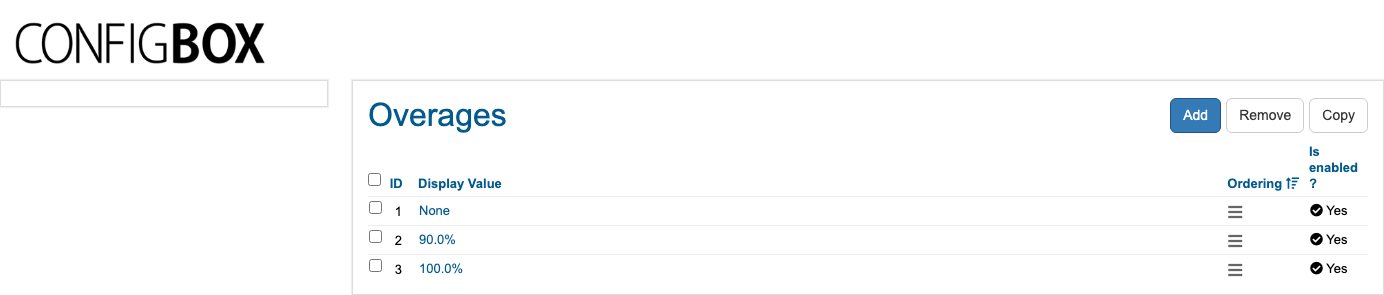
- Overages — the selectable overage values shown when building a quote (for example None, 90.0%, 100.0%), each with an Is enabled? switch. An overage adds an agreed percentage on top — turn one off to stop it being offered without deleting it.
Steps (any of the lists)
- Open the list from the Quote Console menu group.
- Click Add (or an entry to edit it).
- Fill in the entry (a name; or a title and percentage), and Save.
- Where a Is enabled? switch or drag-ordering is shown, use it to control what's offered and in what order.
What happens next
- Your changes appear as options in the Quote Console the next time a sales agent builds or edits a quote.
Good to know
- These lists feed dropdowns. Adding a tax rate, term, or manager here makes it selectable on quotes; removing one takes it out of the choices (existing quotes keep what they were saved with).
- Disable instead of delete where an Is enabled? switch exists (Overages) — it's reversible.
- Order matters where a drag handle is shown — it sets the order the options appear in.
Screens and labels can differ slightly between environments — if a label doesn't match what you see, check with your Beta-Calco contact.