Set up the regions (the flag picker)
Audience: operators · Scope: the Regions screen · Last reviewed: 2026-07-20
What this does — The little flag in the site header lets a visitor say where they are. That choice is far more than cosmetic: it puts them into a customer group, which sets the currency they're quoted in and which products they see, and it sets whether the site shows imperial or metric units.
Because a region rewrites a visitor's pricing group, treat this screen as a pricing setting, not a content one. It sits alongside customer groups for that reason.
Before you start
-
Be signed in — see Log in to the admin area.
-
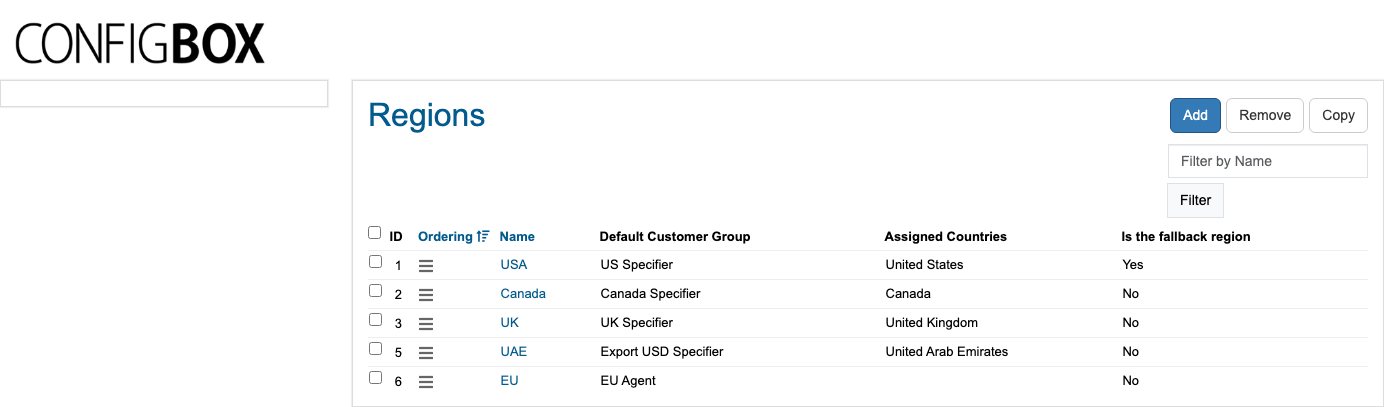
Click Regions in the menu. The list shows Name, Default Customer Group, Assigned Countries, and Is the fallback region — Beta-Calco runs USA, Canada, UK, UAE and EU.
-
Know which customer group the region should hand people to. That group carries the currency, so pick it first.
Add or change a region
- Click Regions, then Add (or open an existing region).
- Fill in:
- Name (required) — as it appears in the header picker.
- Default Customer Group (required) — the group visitors from this region are put into. This is what decides their currency.
- Default Measurement System (required) — imperial or metric.
- Flag Image (required) — the small flag in the header. About 40 × 40 px works best.
- Assigned Countries — the countries that should be detected as this region.
- Is the fallback region — see below.
- Ordering — the order the regions appear in the picker.
- Click Save.
The fallback region
If a visitor's location can't be worked out, or their country isn't assigned to any region, they're treated as being in the fallback region.
Exactly one region should be the fallback. The screen doesn't stop you ticking several — if you do, which one wins is unpredictable. Today USA is the fallback.
What happens next
- The picker in the site header updates on the next page load.
- When a visitor picks a region, they're moved into that region's Default Customer Group immediately — so prices switch currency, and the catalog may show a different set of products.
- Their units switch to the region's measurement system (the IMPERIAL / METRIC toggle in the header reflects this).
Good to know
- Changing a region's Default Customer Group changes pricing for everyone who picks it. Double-check the group's currency before you save.
- Visitors can move themselves between groups simply by changing region. That's intended — it's how the site serves several markets — but it's also why someone can report "the prices changed": they switched region.
- A country can only sensibly belong to one region. Assign each country once.
- A region with no countries assigned can still be picked manually from the header; it just won't be detected automatically. EU is set up that way today.
- Signed-in staff and agents normally sit in a group set for them directly, so the region picker matters most for anonymous visitors and specifiers.
Troubleshooting
- A visitor sees the wrong currency. They're in the region whose group carries that currency — check the region's Default Customer Group, and see customer groups.
- A new region's flag doesn't show. Check the Flag Image uploaded and that the region has an Ordering value.
Screens and labels can differ slightly between environments — if a label doesn't match what you see, check with your Beta-Calco contact.