Import the follow-up stages from Pipedrive
Audience: operators & admins · Scope: the Imported Pipedrive Stages list · Last reviewed: 2026-07-24
What this does — The project stage an agent picks on the follow-up link comes from a Pipedrive pipeline. This article shows how to import those stages and set how they appear to agents. You do this once at setup, and again whenever the pipeline changes in Pipedrive.
Before you start
- Be signed in — see Log in to the admin area.
- Nothing else. Import first, then pick the defaults (below) — the two dropdowns you pick them from are filled by the import. If you're not sure which pipeline the follow-ups should use, check with your Beta-Calco contact.
Import the stages
- Go to Custom Settings → Quote Follow-ups → Imported Pipedrive Stages.
- Click Import pipelines & stages from Pipedrive. One click imports both — first the pipelines, then the stages — so the list fills with the pipeline's stages: their name, pipeline, and probability % (these come from Pipedrive and are read-only here).
- Read the message it shows. Besides the counts, it warns you if the Default pipeline or Default stage below no longer points at a stage agents can land on (renamed, removed, hidden, or moved to another pipeline) — that's your cue to set a new one.
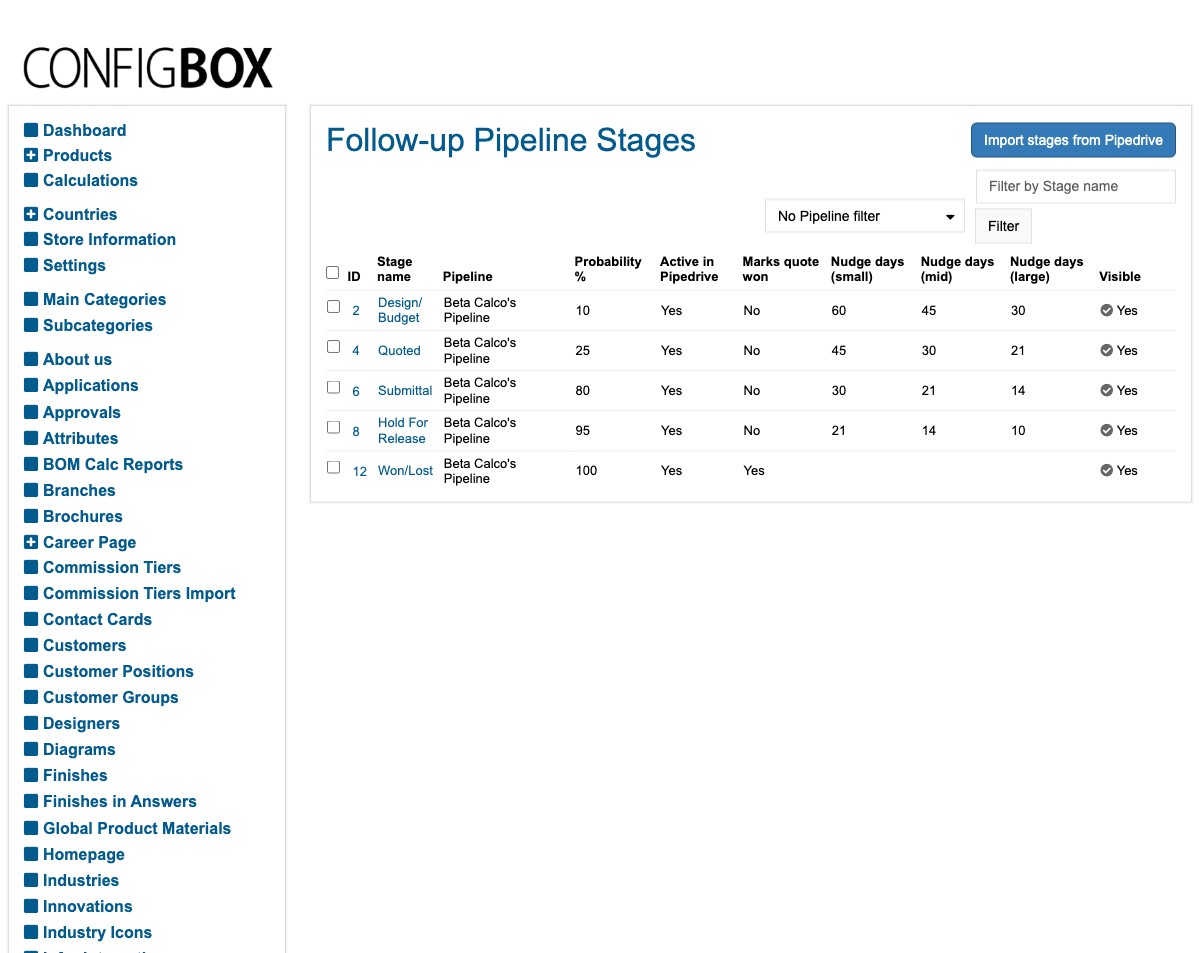
Two id columns sit next to each other, and they are not the same number: ID is this row's internal record number, while PD stage ID is the stage's id in Pipedrive — that is the one quotes are stored against and the one to quote when comparing against a deal in Pipedrive.
Set where a follow-up starts
At the top of the same Quote Follow-ups group are two dropdowns, filled from what you just imported:
- Default pipeline — the pipeline a quote's follow-up uses when the quote isn't already on one of its own.
- Default stage — the stage already selected when an agent opens a follow-up for the first time. It must be one of the Default pipeline's stages; the list is grouped by pipeline to make that easy, and saving is refused if the two don't match.
Entries marked (retired in Pipedrive) or (hidden from agents) are shown so you can see what a stale default is pointing at — don't pick one. If a dropdown shows "(id N — not imported)" at the top, that is the current setting pointing at something that isn't in the imported list at all (e.g. the placeholder set up before your first import) — pick a real entry to replace it.
Save when done.
Curate how agents see them
Open a stage to set the parts you control (these are separate from the Pipedrive-owned fields):
- Visible — untick a stage to hide it from the agent's picker (use this for internal-only stages).
- Marks quote won — tick this on the stage that means "won". Picking that stage on the follow-up page marks the quote won (there's no separate Won button).
- Nudge days (small / mid / large) — the follow-up reminder cadence per quote size — see Change how often a quote reminds you.
- A hint/caption for the stage, where shown.
Save when done.
What happens next
- Agents see the Visible stages on the follow-up page, in pipeline order.
- Picking a stage moves the quote's Pipedrive deal along that pipeline automatically.
Good to know
- Re-importing is safe. It only refreshes the Pipedrive-owned details (name, order, probability). Your follow-up settings (Visible, Marks quote won, Nudge days, hint) are kept.
- Removed stages aren't deleted. A stage removed in Pipedrive is marked inactive rather than deleted, in case a quote still refers to it.
- Renaming in Pipedrive? Re-import afterwards to pull the new names and order, and check the warning the import prints in case your defaults moved with it.
- No pipeline / nothing imported = the agent's stage picker is empty (the rest of the follow-up form still works).
- A stale default isn't fatal. If the Default stage no longer belongs to the pipeline being shown, the follow-up page simply starts on that pipeline's first visible stage instead. Fix the setting when you can.
Screens and labels can differ slightly between environments — if a label doesn't match what you see, check with your Beta-Calco contact.
For developers → docs/quote-follow-up/pipeline-stages.md.