Manage product families
Audience: operators · Scope: product families and family categories · Last reviewed: 2026-07-12
What this does — A product family is the marketing grouping customers browse on the Products / Families pages and see referenced on designer pages (for example Arko, Axalis, Reul). Each family sits in a Family Category (like Decorative or Exterior). This article covers creating and organising them.
Before you start
- Be signed in — see Log in to the admin area.
- Decide the family's name and which Family Category it belongs to.
Manage families
- Click Product Families in the menu. The list shows each family's Name, its Family Category, an Analytics Name, and whether it's Discontinued.
- Click Add to create one, or a family's name to edit it.
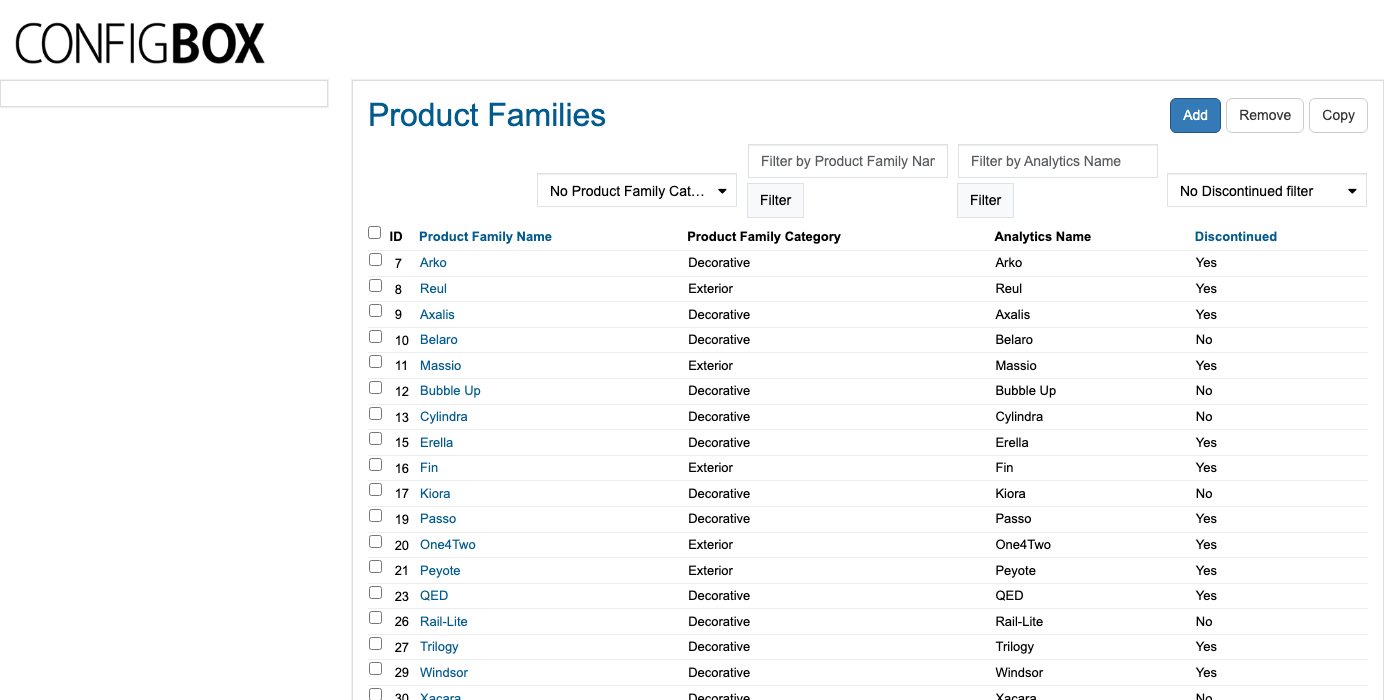 3. Fill in the family's details (name, category, image, and description) and Save.
Manage family categories
Family categories are the buckets families are grouped under.
- Click Family Categories in the menu.
- Add or edit a category the same way, then Save.
What happens next
- New and edited families appear on the public Products / Families area once saved (refresh the public page if you don't see the change immediately — see images & files on caching).
- A family's Family Category controls where it's grouped on those pages.
Good to know
- Analytics Name is the label used in the site's tracking/reporting for that family — set it so reports read cleanly. If you're unsure, leave it matching the family name.
- Discontinued retires a family from the browsing pages without deleting its history.
- Family ≠ category. A product has a subcategory home (its catalog shelf) and a family (its marketing grouping) — see How it fits together.
Screens and labels can differ slightly between environments — if a label doesn't match what you see, check with your Beta-Calco contact.