How the configurator is built (questions, answers and rules)
Audience: operators · Scope: the Options, questions and answers behind a product's configurator · Last reviewed: 2026-07-20
What this does — Explains the machinery behind the configurator a customer uses to build a luminaire: where the choices come from, where the product code and price come from, and how a choice can be made to appear only in certain circumstances.
Read this as orientation, not as an instruction to start editing. Building configurator questions is specialist work — a wrong rule or calculation can silently produce wrong product codes or wrong prices on live quotes. This article is here so you can understand and check what you're looking at, and so you know which small changes are safe. The safe/unsafe split is at the end.
The four building blocks
- Options — the shared library of answers. One entry per possible choice, with the SKU/Code Segment it contributes to the product code and its Price. Menu → Options. This library is shared across the whole catalog and runs to many thousands of entries.
- Configurator pages — each product's configurator is one or more pages, reached by expanding the product in the Products tree in the menu.
- Questions — what the customer is actually asked on a page: Luminaire, CCT/CRI, Finish, Dimming, Emergency, and so on.
- Predefined answers — the choices offered for a question. Each one points at an entry in the Options library, and adds its own settings on top.
So a customer's product code is assembled from the code segments of the answers they pick, and their price from those answers' prices.
Looking at a question
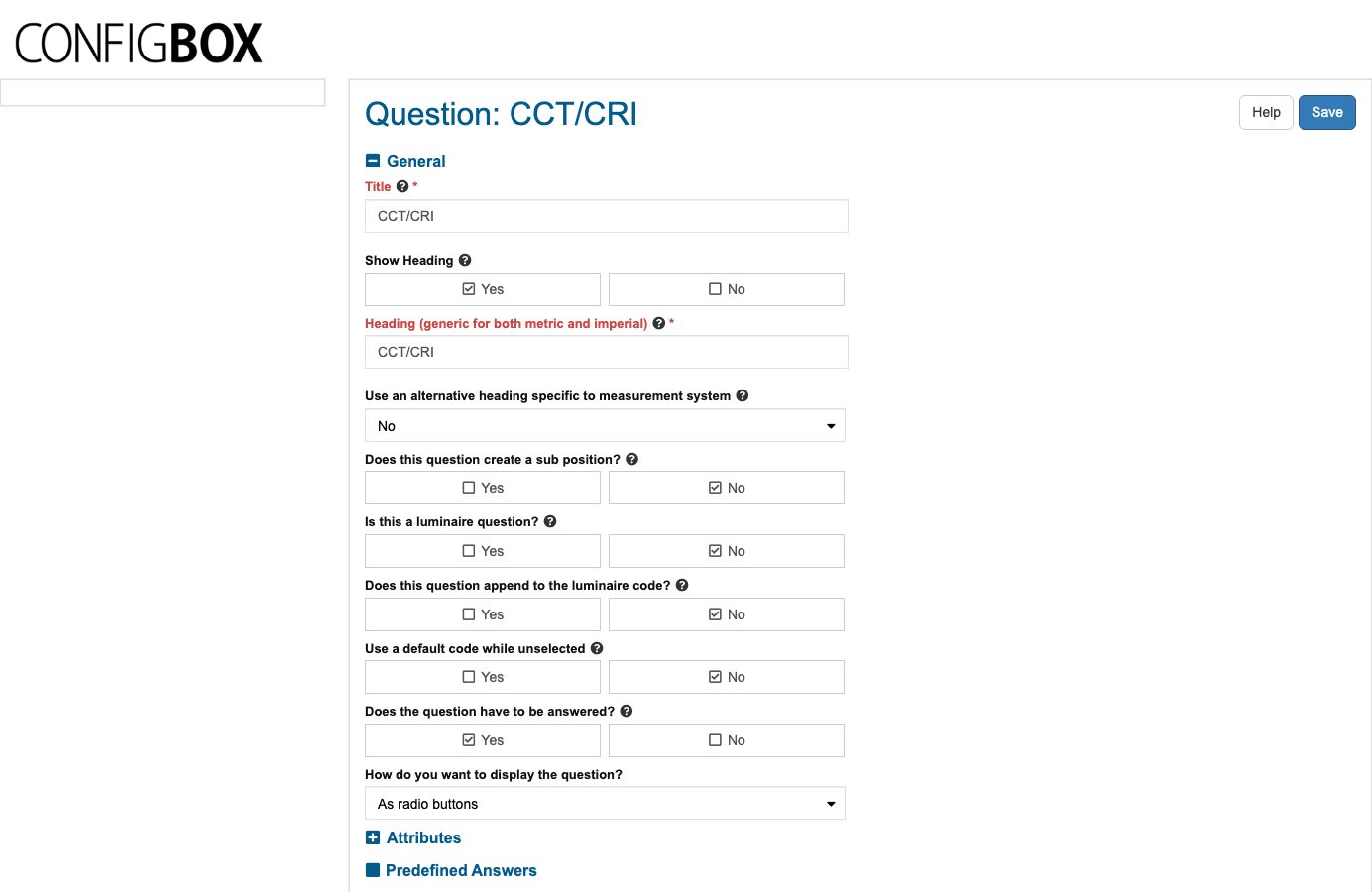
Open a product in the Products tree, open its configurator page, then a question. The form is grouped:
- General — the Title, whether to Show Heading and what the heading says, plus the behaviour switches: Does this question create a sub position?, Is this a luminaire question?, Does this question append to the luminaire code?, Use a default code while unselected, Does the question have to be answered?, and How do you want to display the question? (radio buttons, images, checkbox, and so on).
- Predefined Answers — the grid of choices: Answer SKU, its Rule, whether it's the Default, and whether it's Active.
- Rule — when the whole question should appear.
- Description on configurator page / Description on spec sheet PDF — the explanatory text customers read.
- Attributes, Custom Fields, Misc, Infor CPQ Integration, Heading overrides.
Looking at an answer
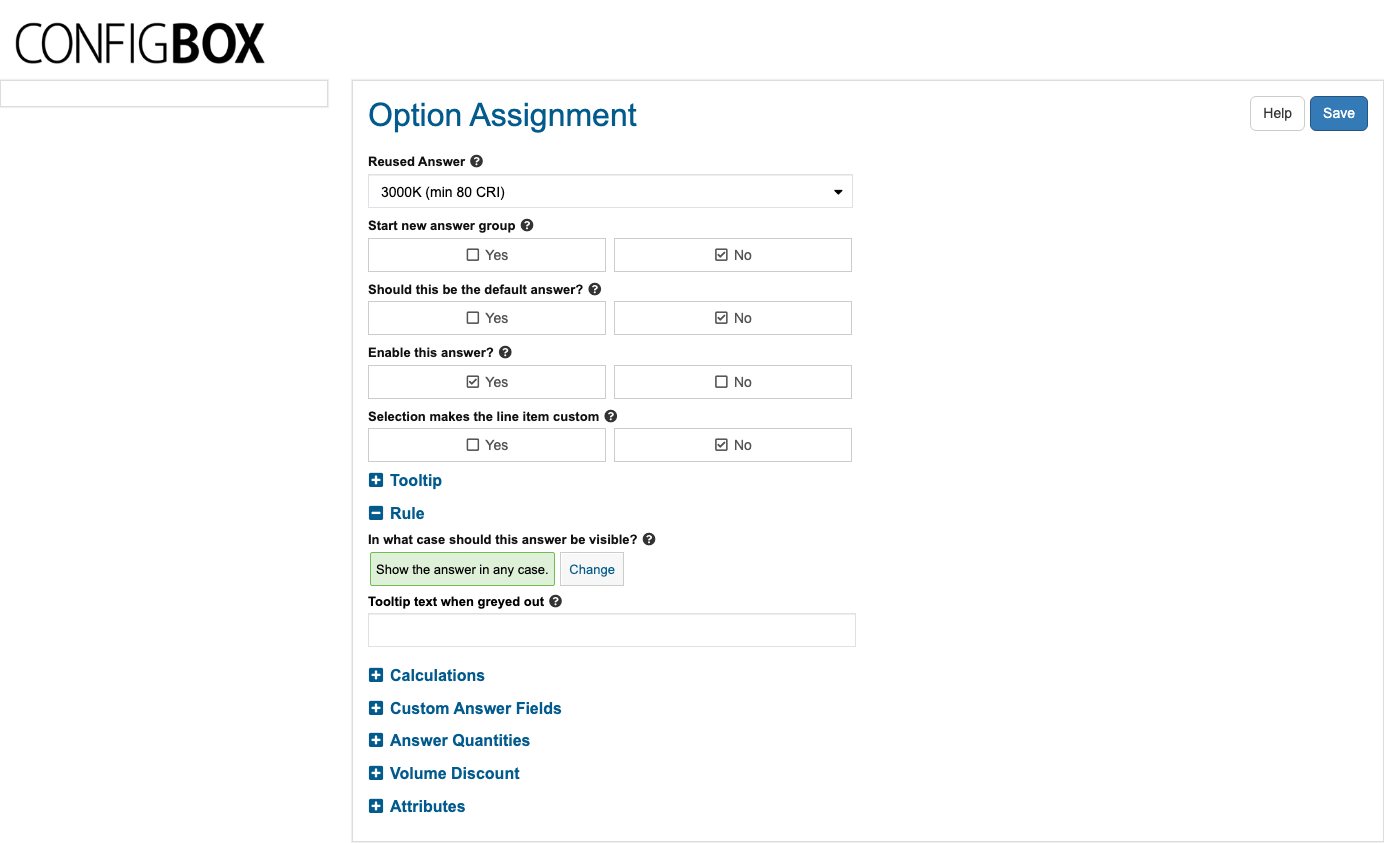
Click an answer in the Predefined Answers grid and you get an Option Assignment:
- Reused Answer — which entry in the Options library this is. This is where the code segment and base price come from.
- Start new answer group, Should this be the default answer?, Enable this answer?, and Selection makes the line item custom.
- Rule — In what case should this answer be visible? Shows the current rule in plain English (by default "Show the answer in any case.") with a Change button that opens the rule builder. Tooltip text when greyed out is what the customer is told when the rule hides or disables it.
- Calculations, Answer Quantities (With quantity selection), Volume Discount, Attributes, Custom Answer Fields.
Rules — showing a choice only sometimes
A rule is what makes the configurator feel intelligent: an emergency option that only appears on certain lengths, a finish that isn't available with a particular trim. Both questions and individual answers can carry one, and the screen always shows the rule as a sentence, so you can read what's configured without editing it.
Reading a rule is safe. Changing one is not — a rule that's slightly too broad silently offers customers a combination that can't be built.
What is safe to change
| Change | Safe? |
|---|---|
| Reading a rule, a code segment or a price to check it | ✅ Yes |
| Fixing a typo in a question Title or heading | ✅ Yes |
| Editing the Description on configurator page wording | ✅ Yes |
| Re-ordering answers within a question | ✅ Usually — it only changes the order customers see |
| Setting an answer to Enable this answer? = No to withdraw it | ⚠️ Check first — it disappears from new quotes |
| Changing a SKU/Code Segment or Price | ⛔ Ask your Beta-Calco contact |
| Adding or editing a Rule | ⛔ Ask your Beta-Calco contact |
| Adding a question, or changing the behaviour switches | ⛔ Ask your Beta-Calco contact |
| Anything under Calculations or Infor CPQ Integration | ⛔ Ask your Beta-Calco contact |
Good to know
- The Options library is shared. Editing an option's price or code segment changes it for every product and question that reuses it — this is the single biggest risk on these screens. If a change should apply to one product only, it must not be made in the shared library.
- Code segments build the product code in question order. Changing one changes the codes on every new configuration.
- Existing quotes aren't rewritten. Quotes already saved keep the codes and prices they were built with; a change here affects new configurations.
- Always check on the site. After any change, open the product on the public site and build a configuration to confirm the code and price come out as expected. The product edit screen has a See product in frontend button for exactly this.
Troubleshooting
- A choice customers expect isn't offered. Check the answer's Enable this answer? switch first, then its Rule — the rule may be hiding it in that combination.
- A product code comes out wrong. Look at which questions have Does this question append to the luminaire code? set to Yes, and at the code segments of the answers picked.
- A price looks wrong. The answer's price comes from the shared Options library entry, unless a calculation overrides it — this one is worth escalating rather than chasing.
Screens and labels can differ slightly between environments — if a label doesn't match what you see, check with your Beta-Calco contact.