Embed an HTML file on a product
Audience: operators · Scope: adding custom HTML to one product's configurator page · Last reviewed: 2026-07-22
What this does — Lets you upload a self-contained .html file that appears in a box below the
Tech Specs section of a product's configurator page, just above the configurator itself. Use it for a rich, one-off block that the
normal fields don't cover — an interactive graphic, a vendor snippet, a special promo layout. The block
sizes itself to fit the content automatically.
How to add it
- Open the product you want (main menu Products → click the product to edit it).
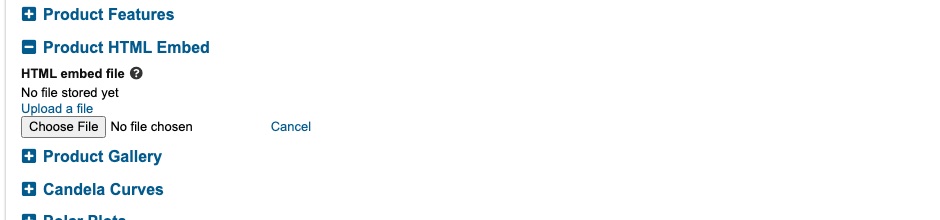
- Open the Product HTML Embed section of the product edit form (it sits with the other page-content sections, next to Product Features and Product Gallery).
- Under HTML embed file, click Upload a file and choose your
.htmlfile. With nothing uploaded yet the field reads No file stored yet. - Save. Reload the product's page on the website — the block shows below Tech Specs, above the configurator.
To replace it, upload a new file and save. To remove it, tick Delete file at save and save.
Good to know
- It's a whole page in a box. The file should be a complete little HTML document (its own styles and scripts inside it). It is shown isolated from the rest of the site — that's deliberate, for security: the embedded file cannot read or change the surrounding page, and the surrounding page can't reach into it. It resizes to its content on its own.
- One file per product. Each product has its own embed. Uploading again replaces the previous one.
- Keep it reasonable. The file must be a UTF-8
.htmlfile up to 5 MB (enough for a self-contained viewer with its 3D model embedded). Images or scripts it pulls from elsewhere still load normally. - Links that open a new tab and forms won't work inside the box (again, by design, for safety). If you need one of those, ask a developer — it can be enabled deliberately.
Note for developers: the technical/security details (file storage, the
sandboxiframe, the serving endpoint, auto-height) are in the reference docdocs/features/product-html-embed.md.