How the catalog and configurator fit together
Audience: operators · Scope: the big picture of products, families, and the configurator · Last reviewed: 2026-07-12
What this does — Gives you the mental map for everything else in this section. Once you know how the catalog is layered and how the configurator turns choices into a product code and price, the day-to-day tasks (editing a product, managing finishes, importing data) all make sense.
Before you start
- You need to be signed in to the admin area — see Log in to the admin area.
The catalog, layer by layer
The catalog is organised in layers. From broadest to most specific:
- Main Categories → Subcategories — the shelves the catalog is built on. Every Product lives in one or more subcategories (a product's Primary subcategory is its main home). These are managed from Main Categories and Subcategories in the menu.
- Products — an individual luminaire line (for example Xacara L™). This is what customers open and configure. Managed from Products.
- Product Families — a marketing grouping that spans the catalog (for example Arko, Axalis), shown on the public Products / Families pages and the designer pages. A product belongs to a family; the family belongs to a Family Category (like Decorative or Exterior). Managed from Product Families and Family Categories.
Separately, a set of tags decides how customers can filter the products page — Applications, Mountings, Shapes, and Attributes. You assign these to a product so it shows up under the right filters (for example Ceiling, Ring, Exterior).
The configurator: choices → a code and a price
When a customer opens a product, they see the configurator — rows of choices (fixture finish, colour temperature, lumen output, dimming, and so on). Each row is an option group, and each choice in it is an Option.
Every option carries three things that matter:
- a Title — what the customer reads (for example 3000K (min 80 CRI)),
- a SKU / Code Segment — the short piece it adds to the product code (for example
30A), and - a Price — what it adds to the product's base price.
As the customer picks options, the code segments assemble into the full product code and the prices add up on top of the base price. That live product code and price are what flow onto the spec sheet and into a quote.
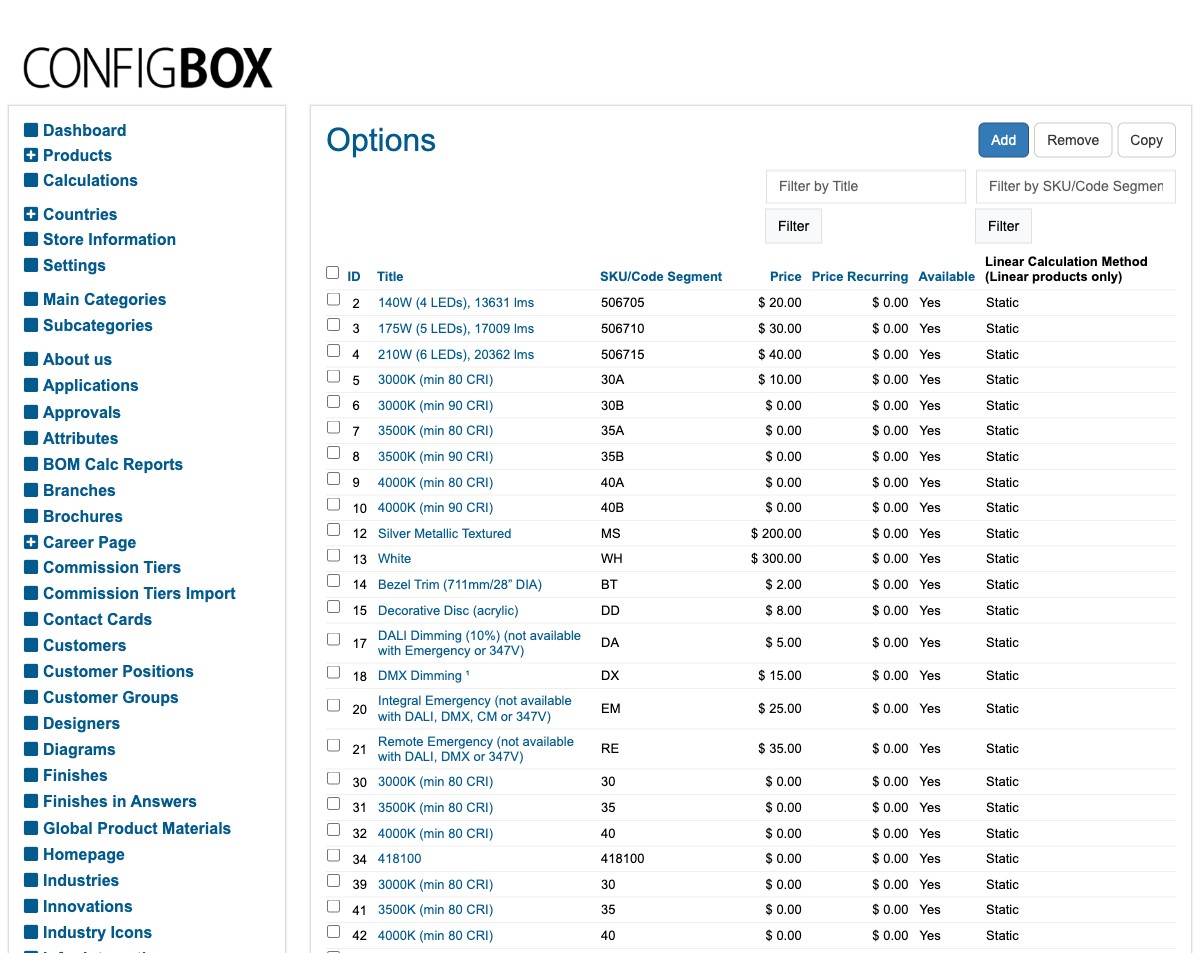
Above: the master list of options. Notice how 3000K (min 80 CRI) carries the code segment 30A and adds
$10, while White carries WH. Those segments are the pieces that build a product's code.
What happens next
- Editing a product (its details, images, pricing, visibility, and the data behind its spec sheet) is the most common job — see Add or edit a product.
- The lumen/photometric numbers behind the configurator come from an import you run — see Import performance (photometric) data.
Good to know
- A product can sit in several subcategories but has just one Primary subcategory — that's its canonical home and the one used where a single category is needed.
- Families are for browsing and marketing, not the same as categories. A product has both a category home and a family.
- Changing which options a product offers, or an option's price, is a specialist job — see How the configurator is built for what's safe to change yourself.
Screens and labels can differ slightly between environments — if a label doesn't match what you see, check with your Beta-Calco contact.